 |
CriWare Unreal Engine
Plug-ins for CriWare solutions.
|
|
CriWare Unreal Engine
Plug-ins for CriWare solutions.
|
Sound xR is a virtual stereophonic audio processing for earphones and headphones (Binauralizer) made by Yamaha. It enables interactive and high-quality sound image localization and sound space design.
You can find more information about Sound xR from Yamaha's website.
Sound xR will be enabled only if the following conditions are met.
First, edit you Atom Carft project to setup the software binauralizer type and build the ACF file. (Please refer to the CRI Atom Craft documentation for more information.)

Then, import your .acf file built by Atom Craft to your unreal project.
Finally, enable the 'CriWare ADX Sound xR' plugin in the project plugins list.
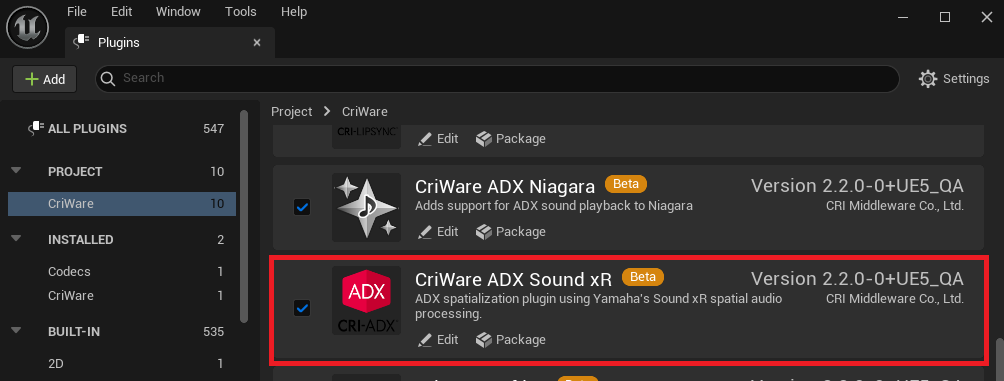
Now you are ready to use Sound xR with your cues and wave sounds.
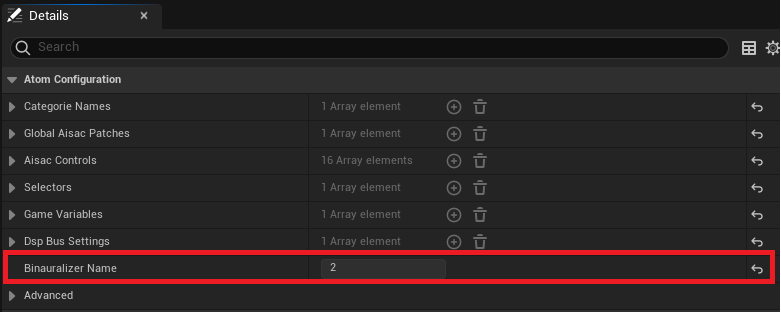
#### Tips: How to check if the Atom Configuration is ready for Sound xR in Unreal Engine. Open the details screen of the improted Atom Config asset in the content browser. Then check the value in Atom Configuration categroy / Binauralizer Name:
- If it is set to "2", the software binauralizer is set to Sound xR.
- Any other values means that the ADX's original HRTF software binauralizer is set.
In order to listen sound with Sound xR you need to send it to an Atom soundfield rack. Please refer to Soundfields manual.
 1.9.7
1.9.7