
CriWare Unreal Engine
Plug-ins for CriWare solutions.
Loading...
Searching...
No Matches
Atom Soundfield Rack Asset

About

A soundfield is an audio representation of a spatial area, real or virtual.

Atom Soundfield Rack are particular types of Atom ASR rack that encode sound to a specific spatial rendering. It can be ambisonics, binaural or object based audio.

Create Atom Soundfield Rack

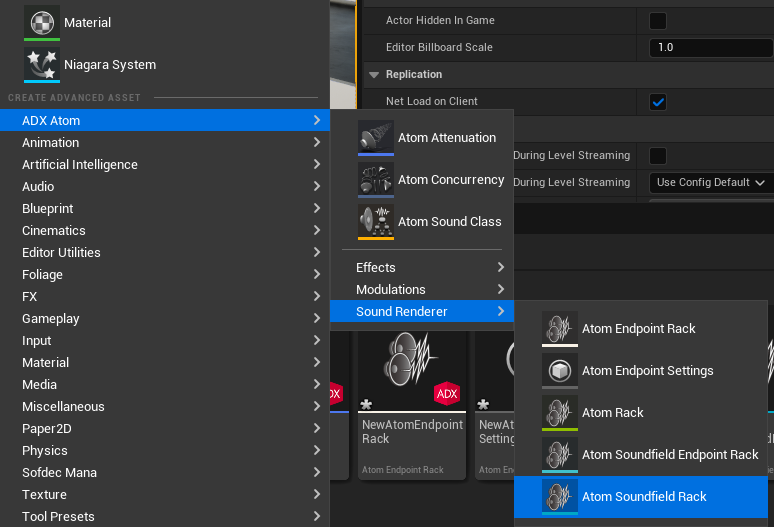
To set up a new Atom Soundfield Rack, right-click from the Content Browser, then select ADX Atom > Sound Renderer > Atom Soundfield Rack.
Atom Soundfield Rack Properties

To open the Details panel for a Atom Soundfield Rack, double-click the Atom Soundfield Rack in the Content Browser.
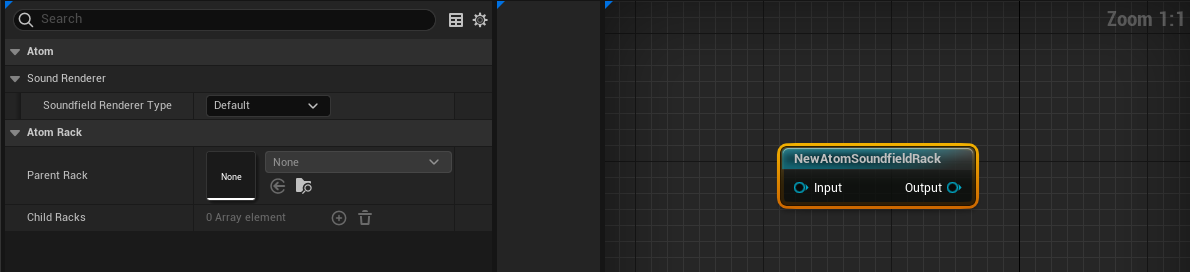
Soundfiled Renderer Type

This is the properties that determines the soundfiled encoding. In other word how the inputs sounds are tranformed to a spatilized sound sound. Depending the type of spatialization wanted, sound encoding will varies and availables properties will changes.

Soundfiled Renderer Type.

  • Default - No Encoding: Rack is like a default ASR Rack. It uses channel based panning. It can be used as a channel 'bed' Rack. Default Racks are not binauralized when a binauralizer is enabled for headphones and earphones.
  • Channel Spatialization: Rack uses channel based panning. Channel Spatialization Racks can be binauralized when a binauralizer is enabled for headphones and earphones.
  • Ambisonics: Rack can read and decode sound sources encoded in ambisonic formats as input. Ambisonics Racks can be binauralized when a binauralizer is enabled for headphones and earphones.
  • Sound Object: Rack can use Object Based sound sources (Mono). Sound based object sends their position information to the device and a remapped in accurate way depending user sound listening environment. Up to 16 sounds per rack are traited as sound object. Other sounds will be redirected to the main Atom Rack. Sound Object Racks can be binauralized when a binauralizer is enabled for headphones and earphones.

Link with Atom Rack

Atom Soundfield Rack can be connected to normal Atom Rack in the Rack graph editor.
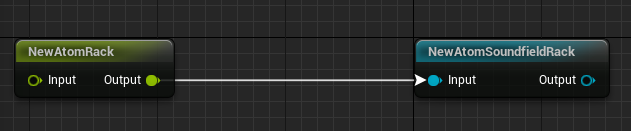
For configuration instructions, please refer to the AtomRack asset documentation.